> ## Documentation Index
> Fetch the complete documentation index at: https://docs.kadoa.com/llms.txt
> Use this file to discover all available pages before exploring further.
# WebSockets
> Receive real-time event notifications via WebSockets
Connect to Kadoa's WebSocket server for instant event notifications. Kadoa broadcasts events to your connected clients.
WebSockets are Kadoa's lowest-latency notification channel, but they should be treated as a best-effort realtime transport rather than an exactly-once delivery system. For critical workflows, make your event handling idempotent and use `event.id` as a dedupe key.
## Setup
```typescript title="Node SDK" theme={null}
import { KadoaClient } from "@kadoa/node-sdk";
const client = new KadoaClient({ apiKey: "YOUR_API_KEY" });
const realtime = await client.connectRealtime();
realtime.onEvent((event) => {
console.log("Event:", event.type, event.message);
});
realtime.onConnection((connected) => {
console.log("Connected:", connected);
});
realtime.onError((error) => {
console.error("Error:", error);
});
```
```python title="Python SDK" theme={null}
import asyncio
from kadoa_sdk import KadoaClient, KadoaClientConfig
async def main() -> None:
client = KadoaClient(KadoaClientConfig(api_key="YOUR_API_KEY"))
realtime = await client.connect_realtime()
realtime.on_event(lambda event: print("Event:", event))
realtime.on_connection(lambda connected, reason=None: print("Connected:", connected))
realtime.on_error(lambda error: print("Error:", error))
try:
await asyncio.Event().wait()
finally:
await realtime.close_async()
asyncio.run(main())
```
`workflow_failed` message fields: required `workflowId`, `source`, `reason`, `action`; optional `workflowName`, `sourceUrl`, `url`.
`workflow_recovered` message fields: required `workflowId`, `workflowName`, `source`; optional `sourceUrl`, `url`.
For API configuration, see the [API reference](/api-reference/notifications).
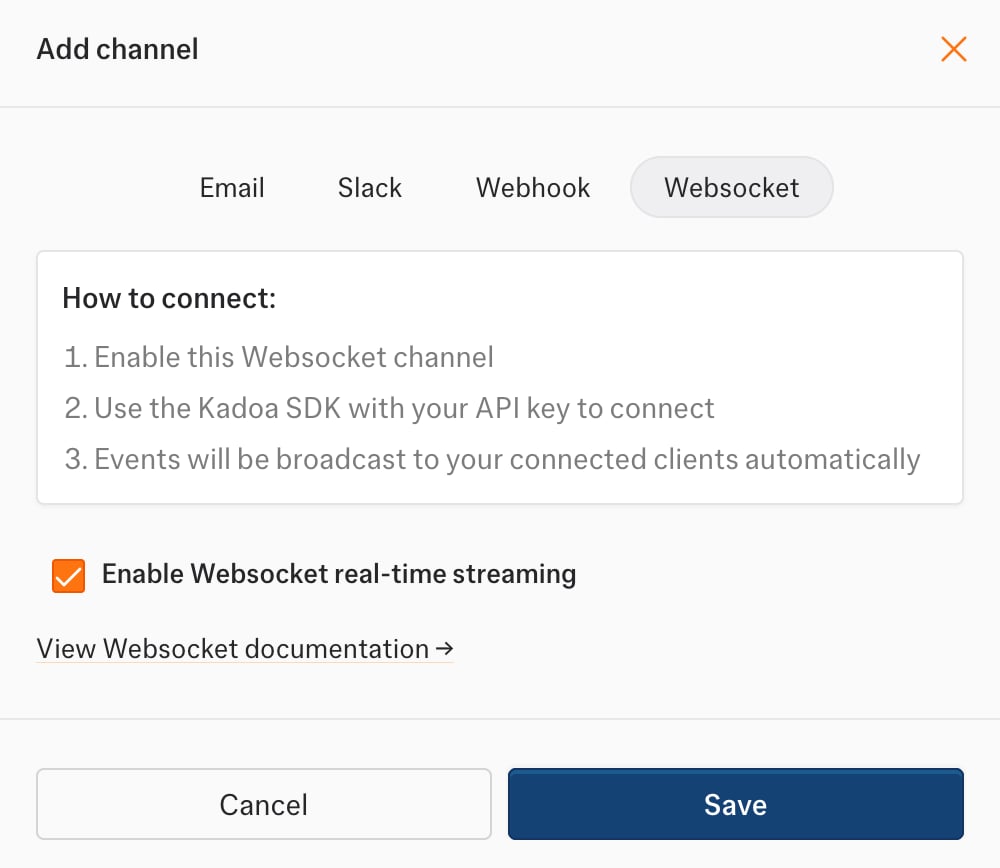
### Dashboard Setup
1. Go to **Notifications** in the sidebar
2. Click **Add Channel** → **WebSocket**
3. Select the **Enable Websocket real-time streaming** checkbox.
 ## Connect to both EU and US
Keep two WebSocket connections open concurrently, one to each regional endpoint:
| Connection | Endpoint |
| ---------- | ----------------------------- |
| EU | `wss://realtime-eu.kadoa.com` |
| US | `wss://realtime-us.kadoa.com` |
`wss://realtime.kadoa.com` routes to the nearest healthy region. Using it alongside
the US endpoint does not guarantee connections to two different regions.
1. Use the same team's API key for both connections. For each connection, request
a token with `POST https://api.kadoa.com/v4/oauth2/token`, passing the key in
the `x-api-key` header. The response contains `access_token` and `team_id`.
2. Connect to each regional endpoint with `?access_token=` appended.
Keep API keys, tokens, and authenticated URLs out of logs.
3. Send the following message on **both** sockets, using the returned `team_id`:
```json theme={null}
{ "action": "subscribe", "channel": "" }
```
4. Confirm each socket receives `subscribe.ack`. Its `region` should be
`europe-west3` for EU and `us-east1` for US. Treat acknowledgments, heartbeats,
and `control.draining` messages separately from business events.
5. Both sockets receive the same team feed. Process the first arrival of each
event and deduplicate subsequent copies by `event.id` across both connections.
If separate processes consume the sockets, they need shared deduplication or
idempotent downstream processing.
6. Reconnect each socket independently to its regional endpoint, obtaining a fresh
token and subscribing again. Track the latest `_cursor` separately for each
connection, including duplicate deliveries, and send it as `lastCursor` when
resubscribing. Follow the drain and heartbeat handling below while keeping the
other connection active.
To verify the setup, disconnect EU and confirm US continues receiving events.
Restore EU, then repeat for US. Both regions share upstream event infrastructure;
this protects against a connection or regional serving failure, not every possible
pipeline outage.
## Reconnects and Redeploys
During an infrastructure drain or redeploy, Kadoa sends a `control.draining` message before closing the socket. This is an expected lifecycle event, not a workflow failure and not a permanent outage.
Clients should reconnect automatically when they receive `control.draining`:
1. Detect `control.draining`.
2. If it includes `retryAfterMs`, wait roughly that long. Otherwise use a short reconnect delay.
3. Open a new WebSocket connection.
4. Re-subscribe to your team channel after the new connection is open.
Kadoa also sends heartbeat messages. If your client stops receiving heartbeats for too long, close the stale socket and reconnect using the same flow.
After the drain notice, Kadoa will close the old socket with close code `1001` and reason `Server shutting down`. Treat that close as the final shutdown of the old connection, not as a workflow error.
### Reliability Notes
* WebSockets are optimized for low-latency notifications, not for guaranteed exactly-once delivery.
* A reconnecting client can still observe a brief gap during deploys, drains, or network interruptions.
* Custom clients can reduce that gap by persisting the latest event `_cursor` and re-subscribing with `lastCursor`.
* Even with overlap-aware reconnects, clients should treat `event.id` as an idempotency key and dedupe repeated deliveries.
### Advanced Custom Client Behavior
Kadoa may send an additive control-plane message before closing a socket:
```json theme={null}
{
"type": "control.draining",
"connectionId": "12345-1711111111111-7",
"retryAfterMs": 500,
"deadlineAt": "2026-03-22T14:05:30.000Z",
"resumeSupported": true
}
```
Business events may include an optional `_cursor`:
```json theme={null}
{
"eventType": "workflow_finished",
"id": "event-uuid",
"timestamp": "2025-01-15T10:30:00.000Z",
"_cursor": "1742-0",
"message": {}
}
```
If you run a custom client and want lower-disruption reconnects, store the latest `_cursor` and re-subscribe with:
```json theme={null}
{
"action": "subscribe",
"channel": "",
"lastCursor": "1742-0"
}
```
This improves continuity, but it is still not a promise of zero-loss or exactly-once delivery.
```python title="Python reconnect example" theme={null}
import json
import threading
from collections.abc import Mapping
import requests
import websocket
API_KEY = "YOUR_API_KEY"
PUBLIC_API_URI = "https://api.kadoa.com"
WSS_API_URI = "wss://realtime.kadoa.com"
RECONNECT_DELAY_SECONDS = 5
CONNECTION_DRAINING_CLOSE_CODE = 1001
team_id: str | None = None
last_cursor: str | None = None
def fetch_access_token() -> tuple[str, str]:
response = requests.post(
f"{PUBLIC_API_URI}/v4/oauth2/token",
headers={"Content-Type": "application/json", "x-api-key": API_KEY},
timeout=10,
)
response.raise_for_status()
data: Mapping[str, object] = response.json()
access_token = data["access_token"]
current_team_id = data["team_id"]
if not isinstance(access_token, str) or not isinstance(current_team_id, str):
raise ValueError("Token response must include string access_token and team_id values")
return access_token, current_team_id
def connect() -> None:
access_token, current_team_id = fetch_access_token()
def on_open(ws: websocket.WebSocketApp) -> None:
global team_id
team_id = current_team_id
payload = {"action": "subscribe", "channel": current_team_id}
if last_cursor:
payload["lastCursor"] = last_cursor
ws.send(json.dumps(payload))
def on_message(ws: websocket.WebSocketApp, message: str) -> None:
global last_cursor
payload: Mapping[str, object] = json.loads(message)
if payload.get("type") == "heartbeat":
return
if payload.get("type") == "control.draining":
retry_after_ms = payload.get("retryAfterMs")
retry_after_seconds = (
retry_after_ms / 1000
if isinstance(retry_after_ms, (int, float))
else RECONNECT_DELAY_SECONDS
)
threading.Timer(retry_after_seconds, connect).start()
return
cursor = payload.get("_cursor")
if isinstance(cursor, str):
last_cursor = cursor
print("event", payload["eventType"], payload)
def on_close(
ws: websocket.WebSocketApp,
close_status_code: int | None,
close_msg: str | None,
) -> None:
print(f"closed code={close_status_code} reason={close_msg}")
if close_status_code == CONNECTION_DRAINING_CLOSE_CODE:
print("old draining socket closed")
def on_error(ws: websocket.WebSocketApp, error: object) -> None:
print("websocket error", error)
socket = websocket.WebSocketApp(
f"{WSS_API_URI}?access_token={access_token}",
on_open=on_open,
on_message=on_message,
on_close=on_close,
on_error=on_error,
)
socket.run_forever()
connect()
```
## Event Handling
Filter events by type:
```typescript theme={null}
realtime.onEvent((event) => {
switch (event.type) {
case "workflow_finished":
console.log("Workflow completed:", event.message.id);
break;
case "workflow_data_change":
console.log("Data changed:", event.message.differences);
break;
case "workflow_failed":
console.log("Workflow failed:", event.message.reason);
break;
case "workflow_recovered":
console.log("Workflow recovered:", event.message.workflowId);
break;
}
});
```
## Event Format
All events follow this structure:
```json theme={null}
{
"eventType": "event_name",
"id": "event-uuid",
"timestamp": "2025-01-15T10:30:00.000Z",
"_cursor": "1742-0",
"message": { /* event-specific data */ }
}
```
```json title="workflow_data_change" theme={null}
{
"eventType": "workflow_data_change",
"id": "2df91fbd-74c1-4d11-91aa-50030393574b",
"timestamp": "2025-01-15T10:30:00.000Z",
"message": {
"id": "change_123",
"workflowId": "wf_123",
"data": [
{ "id": "record-1", "name": "Product A", "price": 29.99 }
],
"differences": [
{
"type": "changed",
"fields": [
{ "key": "price", "value": 29.99, "previousValue": 24.99 }
]
}
],
"url": "https://monitored-page.com",
"createdAt": "2025-01-09T10:00:00Z"
}
}
```
```json title="workflow_finished" theme={null}
{
"eventType": "workflow_finished",
"id": "event-uuid",
"timestamp": "2025-01-15T10:30:00.000Z",
"message": {
"id": "wf_123",
"jobId": "job_456",
"source": "scheduler"
}
}
```
```json title="workflow_failed" theme={null}
{
"eventType": "workflow_failed",
"id": "event-uuid",
"timestamp": "2025-01-15T10:30:00.000Z",
"message": {
"workflowId": "wf_123",
"workflowName": "Product Monitor",
"source": "Product Monitor",
"sourceUrl": "https://monitored-page.com",
"url": "https://monitored-page.com",
"reason": "Access blocked by bot protection",
"action": "No action needed. We'll email you when the workflow recovers."
}
}
```
```json title="workflow_recovered" theme={null}
{
"eventType": "workflow_recovered",
"id": "event-uuid",
"timestamp": "2025-01-15T10:45:00.000Z",
"message": {
"workflowId": "wf_123",
"workflowName": "Product Monitor",
"source": "Product Monitor",
"sourceUrl": "https://monitored-page.com",
"url": "https://monitored-page.com"
}
}
```
```json title="workflow_validation_anomaly_change" theme={null}
{
"eventType": "workflow_validation_anomaly_change",
"id": "event-uuid",
"timestamp": "2025-01-15T10:30:00.000Z",
"message": {
"validationId": "val_123",
"workflowId": "wf_123",
"jobId": "job_456",
"anomaliesCountTotal": 15,
"anomaliesChangeTotal": 10,
"anomaliesByRule": [
{ "ruleName": "missing_values", "count": 8, "change": 5 }
],
"previousJobId": "job_455",
"workflowName": "Product Monitor",
"createdAt": "2025-01-15T10:30:00Z"
}
}
```
## Connect to both EU and US
Keep two WebSocket connections open concurrently, one to each regional endpoint:
| Connection | Endpoint |
| ---------- | ----------------------------- |
| EU | `wss://realtime-eu.kadoa.com` |
| US | `wss://realtime-us.kadoa.com` |
`wss://realtime.kadoa.com` routes to the nearest healthy region. Using it alongside
the US endpoint does not guarantee connections to two different regions.
1. Use the same team's API key for both connections. For each connection, request
a token with `POST https://api.kadoa.com/v4/oauth2/token`, passing the key in
the `x-api-key` header. The response contains `access_token` and `team_id`.
2. Connect to each regional endpoint with `?access_token=` appended.
Keep API keys, tokens, and authenticated URLs out of logs.
3. Send the following message on **both** sockets, using the returned `team_id`:
```json theme={null}
{ "action": "subscribe", "channel": "" }
```
4. Confirm each socket receives `subscribe.ack`. Its `region` should be
`europe-west3` for EU and `us-east1` for US. Treat acknowledgments, heartbeats,
and `control.draining` messages separately from business events.
5. Both sockets receive the same team feed. Process the first arrival of each
event and deduplicate subsequent copies by `event.id` across both connections.
If separate processes consume the sockets, they need shared deduplication or
idempotent downstream processing.
6. Reconnect each socket independently to its regional endpoint, obtaining a fresh
token and subscribing again. Track the latest `_cursor` separately for each
connection, including duplicate deliveries, and send it as `lastCursor` when
resubscribing. Follow the drain and heartbeat handling below while keeping the
other connection active.
To verify the setup, disconnect EU and confirm US continues receiving events.
Restore EU, then repeat for US. Both regions share upstream event infrastructure;
this protects against a connection or regional serving failure, not every possible
pipeline outage.
## Reconnects and Redeploys
During an infrastructure drain or redeploy, Kadoa sends a `control.draining` message before closing the socket. This is an expected lifecycle event, not a workflow failure and not a permanent outage.
Clients should reconnect automatically when they receive `control.draining`:
1. Detect `control.draining`.
2. If it includes `retryAfterMs`, wait roughly that long. Otherwise use a short reconnect delay.
3. Open a new WebSocket connection.
4. Re-subscribe to your team channel after the new connection is open.
Kadoa also sends heartbeat messages. If your client stops receiving heartbeats for too long, close the stale socket and reconnect using the same flow.
After the drain notice, Kadoa will close the old socket with close code `1001` and reason `Server shutting down`. Treat that close as the final shutdown of the old connection, not as a workflow error.
### Reliability Notes
* WebSockets are optimized for low-latency notifications, not for guaranteed exactly-once delivery.
* A reconnecting client can still observe a brief gap during deploys, drains, or network interruptions.
* Custom clients can reduce that gap by persisting the latest event `_cursor` and re-subscribing with `lastCursor`.
* Even with overlap-aware reconnects, clients should treat `event.id` as an idempotency key and dedupe repeated deliveries.
### Advanced Custom Client Behavior
Kadoa may send an additive control-plane message before closing a socket:
```json theme={null}
{
"type": "control.draining",
"connectionId": "12345-1711111111111-7",
"retryAfterMs": 500,
"deadlineAt": "2026-03-22T14:05:30.000Z",
"resumeSupported": true
}
```
Business events may include an optional `_cursor`:
```json theme={null}
{
"eventType": "workflow_finished",
"id": "event-uuid",
"timestamp": "2025-01-15T10:30:00.000Z",
"_cursor": "1742-0",
"message": {}
}
```
If you run a custom client and want lower-disruption reconnects, store the latest `_cursor` and re-subscribe with:
```json theme={null}
{
"action": "subscribe",
"channel": "",
"lastCursor": "1742-0"
}
```
This improves continuity, but it is still not a promise of zero-loss or exactly-once delivery.
```python title="Python reconnect example" theme={null}
import json
import threading
from collections.abc import Mapping
import requests
import websocket
API_KEY = "YOUR_API_KEY"
PUBLIC_API_URI = "https://api.kadoa.com"
WSS_API_URI = "wss://realtime.kadoa.com"
RECONNECT_DELAY_SECONDS = 5
CONNECTION_DRAINING_CLOSE_CODE = 1001
team_id: str | None = None
last_cursor: str | None = None
def fetch_access_token() -> tuple[str, str]:
response = requests.post(
f"{PUBLIC_API_URI}/v4/oauth2/token",
headers={"Content-Type": "application/json", "x-api-key": API_KEY},
timeout=10,
)
response.raise_for_status()
data: Mapping[str, object] = response.json()
access_token = data["access_token"]
current_team_id = data["team_id"]
if not isinstance(access_token, str) or not isinstance(current_team_id, str):
raise ValueError("Token response must include string access_token and team_id values")
return access_token, current_team_id
def connect() -> None:
access_token, current_team_id = fetch_access_token()
def on_open(ws: websocket.WebSocketApp) -> None:
global team_id
team_id = current_team_id
payload = {"action": "subscribe", "channel": current_team_id}
if last_cursor:
payload["lastCursor"] = last_cursor
ws.send(json.dumps(payload))
def on_message(ws: websocket.WebSocketApp, message: str) -> None:
global last_cursor
payload: Mapping[str, object] = json.loads(message)
if payload.get("type") == "heartbeat":
return
if payload.get("type") == "control.draining":
retry_after_ms = payload.get("retryAfterMs")
retry_after_seconds = (
retry_after_ms / 1000
if isinstance(retry_after_ms, (int, float))
else RECONNECT_DELAY_SECONDS
)
threading.Timer(retry_after_seconds, connect).start()
return
cursor = payload.get("_cursor")
if isinstance(cursor, str):
last_cursor = cursor
print("event", payload["eventType"], payload)
def on_close(
ws: websocket.WebSocketApp,
close_status_code: int | None,
close_msg: str | None,
) -> None:
print(f"closed code={close_status_code} reason={close_msg}")
if close_status_code == CONNECTION_DRAINING_CLOSE_CODE:
print("old draining socket closed")
def on_error(ws: websocket.WebSocketApp, error: object) -> None:
print("websocket error", error)
socket = websocket.WebSocketApp(
f"{WSS_API_URI}?access_token={access_token}",
on_open=on_open,
on_message=on_message,
on_close=on_close,
on_error=on_error,
)
socket.run_forever()
connect()
```
## Event Handling
Filter events by type:
```typescript theme={null}
realtime.onEvent((event) => {
switch (event.type) {
case "workflow_finished":
console.log("Workflow completed:", event.message.id);
break;
case "workflow_data_change":
console.log("Data changed:", event.message.differences);
break;
case "workflow_failed":
console.log("Workflow failed:", event.message.reason);
break;
case "workflow_recovered":
console.log("Workflow recovered:", event.message.workflowId);
break;
}
});
```
## Event Format
All events follow this structure:
```json theme={null}
{
"eventType": "event_name",
"id": "event-uuid",
"timestamp": "2025-01-15T10:30:00.000Z",
"_cursor": "1742-0",
"message": { /* event-specific data */ }
}
```
```json title="workflow_data_change" theme={null}
{
"eventType": "workflow_data_change",
"id": "2df91fbd-74c1-4d11-91aa-50030393574b",
"timestamp": "2025-01-15T10:30:00.000Z",
"message": {
"id": "change_123",
"workflowId": "wf_123",
"data": [
{ "id": "record-1", "name": "Product A", "price": 29.99 }
],
"differences": [
{
"type": "changed",
"fields": [
{ "key": "price", "value": 29.99, "previousValue": 24.99 }
]
}
],
"url": "https://monitored-page.com",
"createdAt": "2025-01-09T10:00:00Z"
}
}
```
```json title="workflow_finished" theme={null}
{
"eventType": "workflow_finished",
"id": "event-uuid",
"timestamp": "2025-01-15T10:30:00.000Z",
"message": {
"id": "wf_123",
"jobId": "job_456",
"source": "scheduler"
}
}
```
```json title="workflow_failed" theme={null}
{
"eventType": "workflow_failed",
"id": "event-uuid",
"timestamp": "2025-01-15T10:30:00.000Z",
"message": {
"workflowId": "wf_123",
"workflowName": "Product Monitor",
"source": "Product Monitor",
"sourceUrl": "https://monitored-page.com",
"url": "https://monitored-page.com",
"reason": "Access blocked by bot protection",
"action": "No action needed. We'll email you when the workflow recovers."
}
}
```
```json title="workflow_recovered" theme={null}
{
"eventType": "workflow_recovered",
"id": "event-uuid",
"timestamp": "2025-01-15T10:45:00.000Z",
"message": {
"workflowId": "wf_123",
"workflowName": "Product Monitor",
"source": "Product Monitor",
"sourceUrl": "https://monitored-page.com",
"url": "https://monitored-page.com"
}
}
```
```json title="workflow_validation_anomaly_change" theme={null}
{
"eventType": "workflow_validation_anomaly_change",
"id": "event-uuid",
"timestamp": "2025-01-15T10:30:00.000Z",
"message": {
"validationId": "val_123",
"workflowId": "wf_123",
"jobId": "job_456",
"anomaliesCountTotal": 15,
"anomaliesChangeTotal": 10,
"anomaliesByRule": [
{ "ruleName": "missing_values", "count": 8, "change": 5 }
],
"previousJobId": "job_455",
"workflowName": "Product Monitor",
"createdAt": "2025-01-15T10:30:00Z"
}
}
```